
Power Sound Editor Free is a handy little tool with small size for audio editing, recording, audio CD burning and ripping. If you want to burn your favorite songs to an audio CD for CD player, this editor is also a good assistant to do this. This post is going to show you how to burn Audio CD step by step.
How to Burn Audio CD
Step 1. Download and Install Power Sound Editor Free
Download and install Power Sound Editor Free from our website. There’s a desktop shortcut through which you can launch the program.
Download Power Sound Editor Free
Step 2. Insert the Audio CD
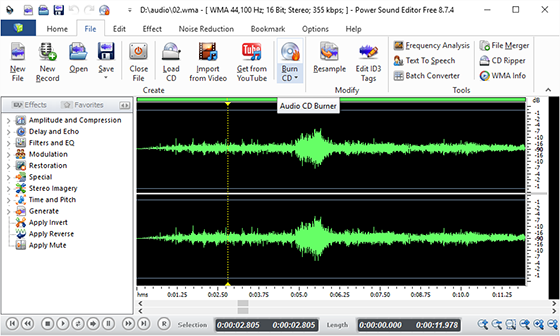
Insert a writable CD into your drive and click “File – Burn CD” and an audio burner wizard pops up. Just click “Next” to proceed further. Choose SCSI transport according to your operating system.
Step 3. Select a Drive
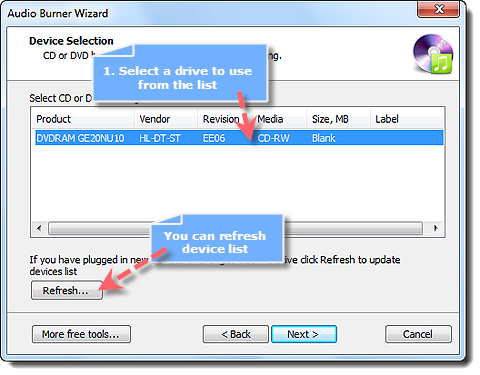
The burner will scan your computer for available CD-RW drive. After that, the available drive will be listed. Choose a drive if you have more than one drives.
Step 4. Add Audio Files
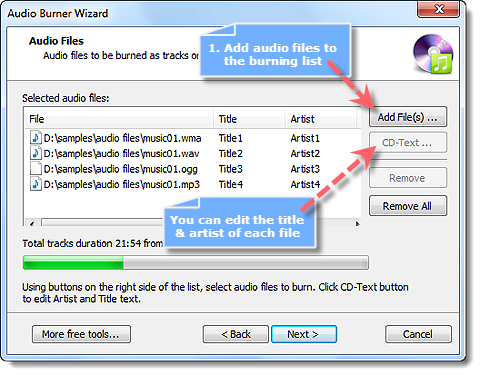
Click the button “Add file(s)” to add the audio files to be burnt to a list. Many audio formats are supported like MP3, WAV, WMA, OGG, etc.
Step 5. Start Burning
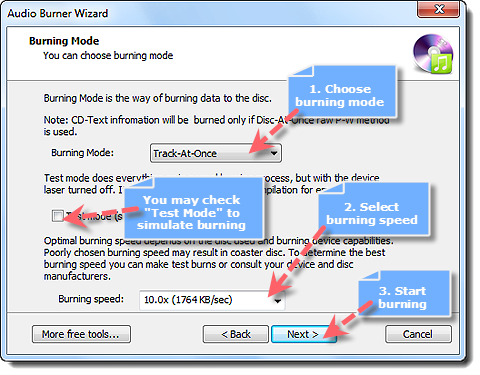
Click “Next” to select options burning mode, test mode, OPC sending (Optimum Power Calibration) and burning speed as needed (Burning speed depends on the disc used and burning device capabilities). Finally, click “Start” to start burning. When the burning progress reaches 100%, the audio CD is done. Enjoy it now with the CD player! Now you’ve learned how to burn Audio CD.
Tips on How to Burn Audio CD
We may run into some common problems when you burn audio CD and here are some suggestions to help you get a perfect disc each time. First, use high-quality, less flawed and name-brand discs. Second, before burning, make sure your disc is clean and without scratches. Third, don’t run too many applications during the burning process in order to avoid data loss. Not all players can play multi-session CDs, so please check your player’s specifications before a burn. Finally, if some of the tracks can’t fit on the CD, reorder the track list to fit.
Conclusion
Choosing the right audio editor software requires you to have a good grip on what it exactly can do to your music. Although there are various software packages on the market, very few programs can be chosen as the best ones to accomplish your goal. The existence of Power Sound Editor Free has been necessitated by its simplicity and a great number of functions. This best audio editing program integrates the audio editor, recorder, CD burner and more others together in one streamlined interface. After you give it a try, you will find anything you need.