
Power Sound Editor Free is a handy little tool with small size for audio editing, recording, audio CD burning and ripping. It can be very useful to record internet streaming audio and the operation is as easy as A, B, C. This post include some tricks you need to know about How to Record Streaming Audio.
How to Record Streaming Audio
Step 1. Download and Install Power Sound Editor Free
How to Record Streaming Audio? First thing’s first, download and install Power Sound Editor Free from our website. There’s a desktop shortcut through which you can launch the program.
Download Power Sound Editor Free
Step 2. Choose Sample Rate and Channel
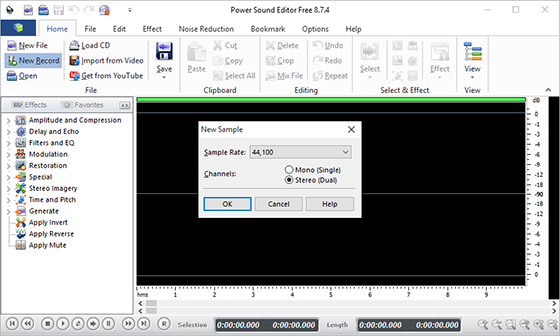
Click “New Record” button and choose sample rate and channel you want. Click “OK”.
Step 3. Start Recording
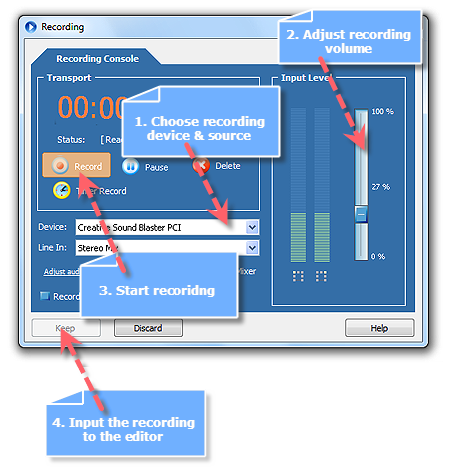
Now the recording tool is activated. Select the recording device. Then, make sure to choose “Stereo Mix” from the “Line In” menu (If not, the streaming won’t be detected). You can also choose to record without silence, set the recording timer and adjust the volume. You may start streaming the audio you want to record and if it’s detected, the signals on the LEDs can be seen. Click “Record” to start recording. Click “Pause” and “Keep” to finish recording and the waveform of the recording displays in the window.
Step 4. Save the Recording
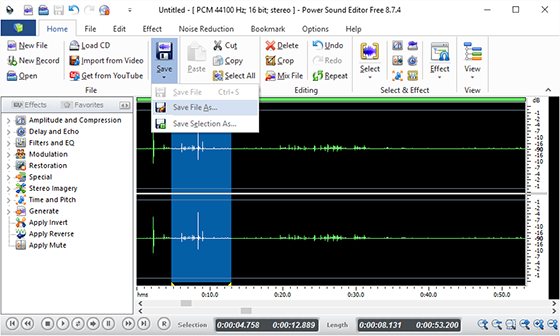
Click “Save – Save File As” and an output window will pop up. You can specify the output folder, output format and output name. Click “Save” and the format settings window is activated. You can use the presets provided or specify the detailed parameters as needed. When all settings is done, click “OK” and wait for a few seconds. The recording will be output to the output location. That’s how to Record Streaming Audio.
What Does Our Customer Think about Power Sound Editor Free?
“Although I’m not tech savvy, Power Sound Editor Free enables me to easily navigate through a simple interface and a step by step download, installation process. It helps me edit and enhance my audio album, record audio, apply so many effects and more others. I like the preset preview feature which allows me to edit music so as to meet my preferences. It is worth a try if you are skeptical about this software.“
– Madeleine Dean
Conclusion
As a solid audio editor, Power Sound Editor Free might belong to the top of your must-have product list. Believe it or not, this audio editor offers power and options you might expect only in proprietary and costly software. It is a great solution for anyone who wants the ease of use for audio editing but not the massive complexity.
It is not all about how to record streaming audio; it can do much more when it comes to audio recording and audio editing. You are enabled to edit music files like a pro with over 30 native effects and the real-time preview function. This feature-rich program is one of the most reliable audio editors available on the market today. The best way to experience Power Sound Editor Free is downloading and installing it right away.